
Parte integrante dell'esperienza di un Mondiale è condividerla. Il gol che qualifica la tua nazionale, l'atmosfera nella fan zone prima del fischio d'inizio, la vista dal tuo posto in uno stadio da 80.000 posti: questi sono momenti che vale la pena immortalare e condividere in tempo reale.
Condividere dall'estero richiede però una connessione dati mobile veloce e affidabile. E ai Mondiali FIFA 2026, che coinvolgono tre paesi e 16 città, avere una connessione dati stabile prima della partenza è ciò che distingue un'esperienza di condivisione senza intoppi da una frustrante. Questa guida spiega nel dettaglio come rimanere connessi e condividere il vostro viaggio ai FIFA 2026 dall'inizio alla fine.
Perché una connessione dati mobile veloce può fare la differenza tra un'esperienza di condivisione riuscita e una fallimentare
L'utilizzo dei social media durante un evento sportivo dal vivo è diverso rispetto all'utilizzo dei social media a casa. Si pubblica da luoghi affollati, insieme a migliaia di altre persone che fanno la stessa cosa. La velocità di rete all'interno e nei dintorni degli stadi nei giorni delle partite può diminuire significativamente a causa della congestione, anche nelle città con una solida infrastruttura 5G.
L'approccio giusto è massimizzare le possibilità di pubblicare contenuti rapidamente quando è necessario: un buon piano dati, un buon segnale e alcune abitudini che si adattino alle condizioni di rete dello stadio. Ecco come fare.
Quanti dati vengono effettivamente utilizzati durante la condivisione?
Prima di scegliere il tuo piano dati, è utile capire cosa consumerai effettivamente. Ecco una panoramica delle attività di condivisione più comuni e del relativo fabbisogno di dati:
| Attività | Dati all'ora | Dati per sessione |
|---|---|---|
| Instagram / TikTok (scorrendo) | 500 MB – 1 GB | ~200 MB / 20 min |
| Carica una foto | — | 2–5 MB ciascuno |
| Carica un video di 1 minuto (HD) | — | ~80–150 MB |
| Storie/Reels di Instagram | 300–600 MB | Circa 30 MB per clip |
| Videochiamata WhatsApp/FaceTime | 200–500 MB | ~100 MB / 15 min |
| chiamata vocale WhatsApp | ~10 MB | Molto basso |
| Google Maps (navigazione attiva) | 10–20 MB | Quasi zero se offline |
Per un utente tipico che condivide attivamente contenuti sui social media durante i Mondiali FIFA 2026 (caricando foto e storie ogni giorno, qualche video occasionale e rimanendo in contatto con amici e parenti a casa), è prevedibile un consumo di 3-5 GB al giorno. In un viaggio di 2-3 settimane, si arriva a un totale di 50-100 GB. Il miglior piano dati per i social media ai Mondiali FIFA 2026 è quello con un generoso quantitativo di dati e senza limitazioni di velocità una volta raggiunto il limite giornaliero.
Il miglior piano dati per i social media ai Mondiali FIFA 2026
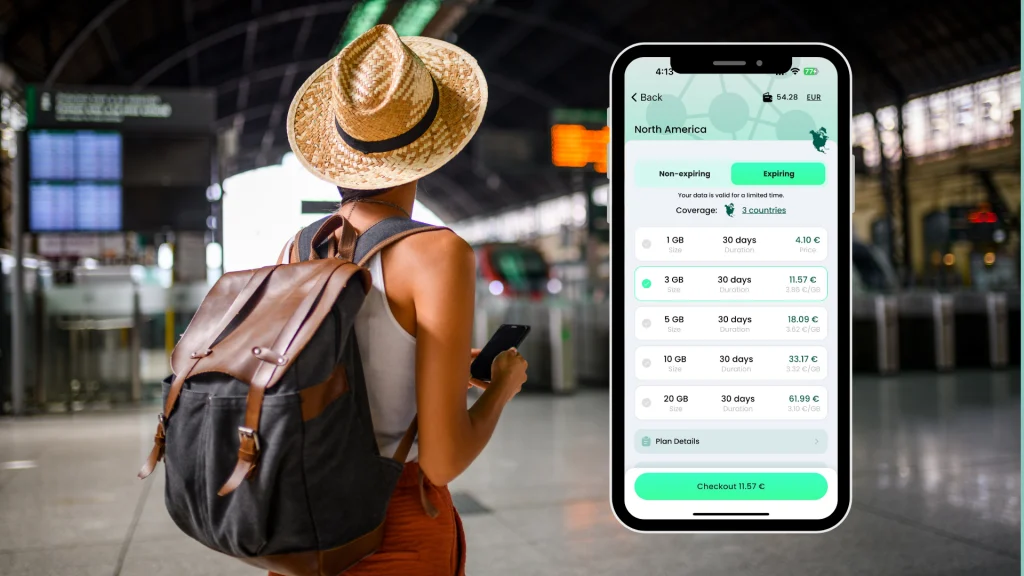
IL BNESIM eSIM regionale per il Nord America è la scelta consigliata per i viaggiatori di FIFA 2026 che desiderano condividere il loro viaggio senza interruzioni. Ecco perché è particolarmente adatta all'utilizzo sui social media:
• Copertura in tutto il Nord America: il piano copre Stati Uniti, Canada e Messico, quindi, che tu stia pubblicando da Guadalajara, Toronto o New York, avrai sempre lo stesso piano tariffario senza dover cambiare SIM durante il viaggio.
• Nessun limite di roaming giornaliero: a differenza di alcune offerte aggiuntive per viaggiatori che riducono la velocità dopo un limite giornaliero, il piano BNESIM ti offre prestazioni costanti per tutta la durata del soggiorno.
• Velocità dati mobili elevate: BNESIM si connette alla rete locale più potente disponibile in ogni paese ospitante, offrendoti le migliori velocità dati che l'infrastruttura eSIM del Nord America può offrire in ogni località.
• Configura il tuo dispositivo prima di partire: l'eSIM è attiva prima ancora dell'atterraggio, quindi potrai iniziare a pubblicare messaggi dall'aeroporto non appena arrivi, senza dover aspettare di trovare un negozio di telefonia.
Consigli per la fotografia e le riprese video durante le giornate di partita.
Per ottenere il massimo dai tuoi contenuti non dipende solo dal tuo piano dati: alcune abitudini ti aiuteranno a migliorare significativamente foto e video.
• Scatta con una buona luce. Le foto migliori degli stadi si scattano nei primi 30 minuti dopo l'ingresso, prima che la luce cambi. I momenti iniziali e finali di una partita spesso regalano gli scatti più suggestivi e ricchi di atmosfera.
• Utilizza la modalità raffica per le foto d'azione. Quando il gioco si svolge vicino alla tua sezione, la modalità raffica cattura il momento che altrimenti perderesti. Seleziona le foto in un secondo momento tramite Wi-Fi, invece di caricare le raffiche non elaborate tramite dati mobili.
• Carica prima i file più piccoli. Instagram e WhatsApp comprimono notevolmente le immagini: il caricamento di foto standard è un utilizzo molto efficiente dei dati. Riserva il tuo traffico dati mobile a foto e brevi video, piuttosto che a file video non elaborati.
• Sfrutta le funzionalità social dell'app ufficiale FIFA. L'app offre contenuti e filtri pensati per condividere le esperienze di gioco: vale la pena esplorarli per l'utilizzo all'interno dello stadio.
• Pubblica le Storie sull'intera griglia. Le Storie vengono compresse in modo più efficace e si caricano più velocemente su reti congestionate. Conserva i post più lunghi per quando sarai connesso al Wi-Fi dell'hotel.
Rimanere in contatto con le persone a casa
Oltre ai social media, un viaggio per i Mondiali significa rimanere in contatto regolarmente con familiari e amici che non hanno potuto partecipare. Ecco cosa usare e quando:
• WhatsApp: l'impostazione predefinita per la comunicazione di gruppo internazionale. Le chiamate vocali e video su WhatsApp utilizzano molti meno dati rispetto a una normale chiamata telefonica instradata tramite il tuo operatore telefonico. eSIM BNESIMLe chiamate e i messaggi di WhatsApp utilizzano il tuo piano dati senza costi aggiuntivi.
• FaceTime / Google Meet: Ottimi per le videochiamate dal tuo hotel o alloggio quando sei connesso al Wi-Fi. Evita di usarli con la connessione dati mobile a meno che il segnale non sia forte: le videochiamate con connessioni lente perdono rapidamente qualità e consumano meno dati.
• iMessage / SMS standard: gli iMessage inviati tramite dati sono gratuiti con il piano BNESIM. Gli SMS standard verso il tuo numero di casa continuano a passare attraverso la tua SIM di casa: ti conviene verificare le tariffe del tuo operatore per gli SMS internazionali se invii messaggi di testo regolarmente.
Cosa aspettarsi dal Wi-Fi negli stadi e nelle sedi delle partite
La maggior parte degli stadi che ospiteranno i tornei FIFA 2026 offrirà il Wi-Fi gratuito ai tifosi all'interno della struttura. In pratica, tuttavia, il Wi-Fi negli stadi durante le partite con il tutto esaurito presenta notevoli limitazioni:
• Velocità: con 60.000-80.000 persone che competono simultaneamente per la larghezza di banda, il Wi-Fi dello stadio in genere offre velocità lente e incostanti durante le ore di punta delle partite.
• Affidabilità: le interruzioni di connessione sono frequenti in situazioni di grande affollamento, soprattutto quando viene segnato un gol e migliaia di persone tentano contemporaneamente di caricare dati.
• Utilizzo ottimale: il Wi-Fi dello stadio è più utile prima dell'inizio della partita, durante l'intervallo e subito dopo il fischio finale, non nei momenti di maggiore affluenza, quando la condivisione è più auspicabile.
Per qualsiasi attività che richieda tempistiche precise, come pubblicare la reazione a un gol o inviare il risultato finale, la connessione dati mobile della tua BNESIM sarà più veloce del Wi-Fi dello stadio nella maggior parte dei giorni delle partite. La connessione dati mobile veloce di cui i viaggiatori di FIFA 2026 hanno bisogno per la condivisione in tempo reale proviene da una buona eSIM, non dal Wi-Fi dello stadio.
La versione breve
I momenti dei Mondiali FIFA 2026 meritano di essere condivisi. Il gol, il pubblico, le fan zone, le città: tutto. Quello che serve è una connessione dati mobile veloce e affidabile che funzioni in tutti e tre i paesi ospitanti, senza limiti giornalieri o interruzioni alle frontiere.
IL BNESIM eSIM regionale per il Nord America è il miglior piano dati per i social media al FIFA 2026. Attivalo prima di partire e ogni momento, dall'arrivo alla partenza, sarà condivisibile senza pensarci due volte.
Ottieni i dati per condividere ogni momento.


 Italiano
  English