
If FIFA 2026 is your first trip to the United States, Canada, or Mexico, welcome. The tournament is going to be extraordinary, and traveling to North America for the first time makes it even more of an adventure. But alongside the excitement, there are practical things to sort — and mobile connectivity is one of the most important.
Getting online quickly and cheaply in an unfamiliar country is not something to leave to chance. This guide covers everything you need to know about how phone networks work in North America, what your connectivity options are, and the easiest way to get set up before you even board the plane.
How Phone Networks Work in North America
The United States, Canada, and Mexico all use modern LTE and 5G mobile networks. The technology is compatible with most international smartphones, so your device will almost certainly work across all three countries. The main things to check are:
• Your phone is unlocked. A locked phone is tied to a single home carrier and cannot use a different SIM card or eSIM. Contact your carrier before your trip to check — and unlock it if necessary. For phones that are fully paid off, unlocking is usually free.
• Your phone supports the right frequency bands. Modern smartphones sold after 2019 broadly support the frequency bands used across North America. If you have an older or budget device, it’s worth checking compatibility with a quick search for your specific model.
• Your home SIM is separate from your data plan. When you arrive in North America, your home SIM will still work for calls and texts via roaming — but data roaming charges from your home carrier can be significant. More on this below.
Your Connectivity Options Explained
There are three main ways first-time visitors can get mobile data in North America for FIFA 2026:
Option 1: Roam on Your Home SIM
The most convenient option on paper: you arrive and your phone just works. The downside is cost.
International data roaming from most home carriers is expensive, and the charges apply in each country separately. Crossing from Mexico into the USA or from the USA into Canada can mean a different daily rate — and the fees add up quickly over a multi-week trip.
Some carriers offer travel day passes (typically a fixed fee per 24 hours for a data allowance), which are an improvement. But for a long trip across three countries, they remain the most expensive option.
Option 2: Buy a Local SIM Card on Arrival
In each host country, you can buy a prepaid local SIM card from a phone shop, carrier store, or airport kiosk. For a single-country visit, this is a solid option. For a multi-country FIFA 2026 trip, it requires buying a new SIM every time you cross a border, visiting a shop in each country, and juggling multiple SIM cards.
In Mexico, English is not universally spoken in phone shops outside major cities. For first-time visitors unfamiliar with the local operators and top-up systems, this can be a frustrating process.
Option 3: Set Up a BNESIM eSIM Before You Leave Home
An eSIM is a digital SIM built into your phone. Instead of inserting a physical chip, you download a data plan via a QR code — a process that takes about five minutes. You can do it at home, in your own language, on a familiar website, before you travel.
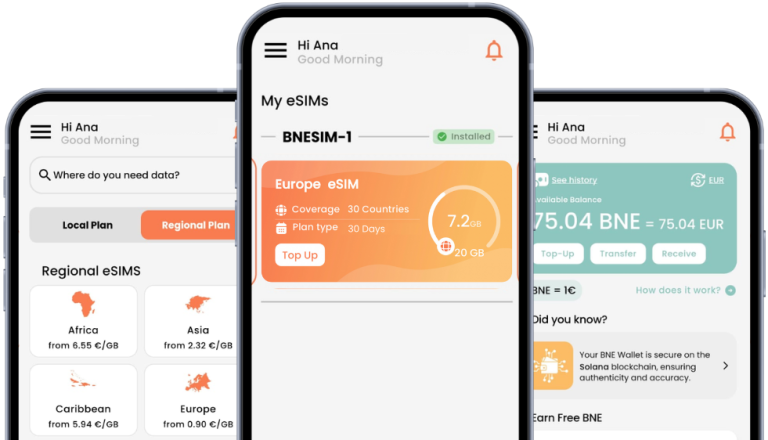
BNESIM’s North America Regional eSIM covers the USA, Canada, and Mexico on a single plan. For first-time visitors, this removes every connectivity complication: no shop to find, no language barrier, no SIM card to lose, and no risk of your data stopping when you cross a border. You arrive connected.
How to Set Up Your BNESIM eSIM: Step by Step
Getting started is straightforward. Here’s the process from start to finish:
- Check that your phone is eSIM compatible and unlocked. iPhone XS and later, Samsung Galaxy S20 and later, and Google Pixel 3 and later all support eSIM. If you’re unsure, search for your exact model online. Visit your provider’s website or BNESIM’s updated compatibility list.
- Visit BNESIM and select the North America Regional plan. Complete your purchase online.
- You’ll receive a QR code by email. On your phone, go to Settings > Mobile / Cellular > Add eSIM and scan the QR code.
- Your phone will download the BNESIM eSIM profile. This takes about 30 seconds.
- In Settings, set BNESIM as your active data line. Keep your home SIM active for calls and texts if you prefer.
- Test your data connection at home before you travel. You should see a BNESIM network indicator in your status bar.
That’s it. You’re connected before you’ve left your house.
Essential Apps for First-Time North America Visitors
Alongside your BNESIM eSIM, download these apps before you leave home:
• Google Maps (with offline maps saved for each host city) — essential for navigating unfamiliar cities
• Google Translate with the Spanish language pack downloaded — useful throughout Mexico
• The official FIFA app — for match schedules, digital tickets, and venue information
• Uber and Lyft — operate across all US and Canadian host cities; Uber also works in Mexico
• Your bank’s app — and notify your bank before you travel to avoid your card being blocked
• A currency converter — USD, CAD, and MXN are the three currencies you’ll encounter
A Few Things Worth Knowing Before You Arrive
For first-time visitors, some basics about North America that are genuinely useful to have before you land:
• Emergency number: 911 in both the USA and Canada. 911 also works in Mexico for most emergencies.
• Tipping culture: expected in restaurants, bars, taxis, and hotels in the USA and Canada. 15–20% is the norm for meals. Mexico has a similar culture in tourist areas.
• Card payments: the USA and Canada are near-cashless. Cards are accepted almost everywhere. Mexico has broader cash usage, particularly at smaller vendors and markets.
• Weather in June–July: hot in Dallas, Houston, and Miami (35°C+ possible). Comfortable in New York, Los Angeles, and Seattle. Cool evenings in Vancouver and San Francisco. High altitude in Mexico City can catch visitors by surprise.
Your First North America Trip, Sorted
Getting online quickly and easily is one of the things that makes unfamiliar travel less stressful. For first-time visitors heading to FIFA 2026, the BNESIM North America Regional eSIM solves the connectivity problem before you even leave home — one setup, three countries, no daily roaming fees.
Sort your eSIM, download your apps, save your offline maps, and you arrive ready to enjoy the tournament from the moment you land.
Ready to get connected for your first North America trip?


 English
  Italiano