

Introduction
Ever wondered how much data WhatsApp uses, or if it’s possible to message without using any data at all? For cost-conscious international travelers, understanding how much data your favorite apps consume can help you stay connected without breaking your budget.
WhatsApp is an essential tool abroad. Whether you’re sending a quick message, sharing travel photos, or hopping on a video call with loved ones, those small interactions add up in data. Sending a few images or chatting for 15 minutes may use more than you expect, especially on a limited plan.
In this guide, you’ll learn how much data different WhatsApp activities use, how to check and manage your usage, and ways to reduce unnecessary data drain. Most importantly, you’ll discover BNESIM’s eSIM with free WhatsApp texting, a unique solution that lets you send and receive WhatsApp texts even when your balance hits zero.
WhatsApp Data Usage Overview
WhatsApp’s data usage varies significantly depending on your activity. Here’s an in-depth look:
Text Messaging
▪︎ ~1 KB per plain text message (without emojis or media).
▪︎ A thousand messages might use around 1 MB.
Photo Sharing
▪︎ Average compressed image: ~150 KB.
▪︎ Sending 20 photos uses around 3 MB.
▪︎ Higher resolution images consume more in backups or non-compressed sends.
Video Sharing
▪︎ Short videos (10 seconds): 1–2 MB.
▪︎ Longer/high-res videos (1 minute): 5–15 MB.
▪︎ Landscape and high-frame videos (30 seconds+): 20 MB or more.
Voice Calls
▪︎ ~0.3–0.5 MB per minute.
▪︎ A 20-minute call uses about 6–10 MB, similar to a single minute of Spotify streaming.
Video Calls
▪︎ ~5–6 MB/minute (standard resolution).
▪︎ HD quality (~10+ MB/min), depending on connection.
Voice Messages
Around 1 MB per minute—slightly more than voice calls but less data than media.
Data Comparison Table
| Activity | Approx. Data Used | What It Means |
| Text Message (no media) | ~1 KB per message | Thousands of texts fit into 1 MB |
| Voice Message (1 minute) | ~100–150 KB | 10 mins ≈ 1–1.5 MB |
| Image (sent or received) | ~100–300 KB per image | Varies by resolution |
| Voice Call (1 minute) | ~300–400 KB | 10 mins ≈ 3–4 MB |
| Video Call (1 minute) | ~5–6 MB | 10 mins ≈ 50–60 MB |
| Shared Video File | ~500 KB to 20 MB+ | Depends on length and quality |
Real-World Usage Examples
1. Light User (Business or Short Trip)
100 texts/day → 0.1 MB
5 photos/day → ~0.75 MB
5 min voice call/day → ~2 MB
Total: ~25 MB/week (100 MB/month)
2. Moderate Traveler (Social Sharing)
200 texts/day → 0.2 MB
10 photos/day → 1.5 MB
15 min calls/week → ~6 MB
5 min video call/week → ~25 MB
Total: ~120 MB/week (500 MB/month)
3. Heavy User (Digital Nomad)
100 texts/day: ~0.1 MB
15 photos/day: ~2.25 MB
3 calls/week (20 min each): ~24 MB
3 video calls (20 min each): ~300 MB
Voice notes usage
Total: ~700 MB/week (~2.8 GB/month)
How to Track WhatsApp Data Usage?
On iPhone
Go to Settings > Mobile Data > Scroll to WhatsApp to see cumulative data usage > Reset at start of travel period
On Android
Settings > Network & Internet > Mobile Network > Select Data Usage > App data usage > WhatsApp
Inside WhatsApp (good for cross-checking)
WhatsApp Menu > Settings > Storage and Data > Network Usage shows exact usage by category.
3 Smart Tips to Reduce WhatsApp Data
Low Data Mode
Go to Settings > Storage and Data > Enable Use Less Data for Calls (~30–50% data savings)
Disable Auto-Download
Settings > Storage and Data > Media Auto-Download > Disable media auto-download to conserve when not on Wi‑Fi.
Disable Background Refresh
▪︎ iOS: Settings > General > Background App Refresh > Off/Selective
▪︎ Android: Restrict background usage via Data Saver features.
WhatsApp vs Other Messaging Apps
| App | Voice Call Usage | Video Call Usage | Photo Upload |
| ~0.4 MB/min | ~5 MB/min | ~150 KB | |
| Signal | ~0.6 MB/min | ~7 MB/min | ~250 KB |
| Facebook Messenger | ~0.5 MB/min | ~6 MB/min | ~200 KB |
The eSIM with Free WhatsApp Texting
What It Is
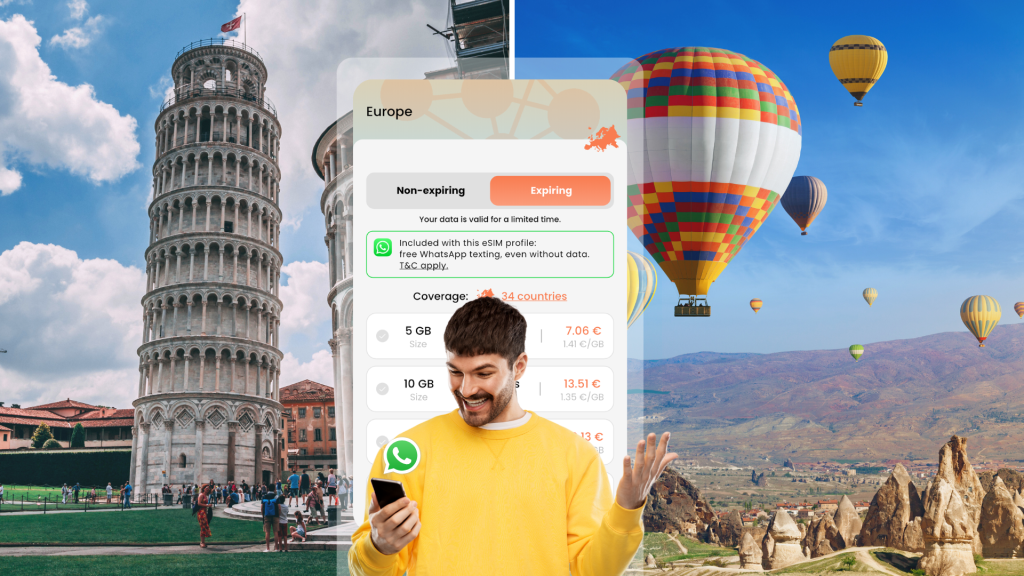
BNESIM’s G1 eSIM activates a built-in data-free WhatsApp channel.
▪︎ Send/receive unlimited free WhatsApp texts even at 0 MB
▪︎ Works across 190+ countries using major networks
▪︎ Comes with flexible plans for short term (30 days) and long terms (no expiration) stay
▪︎ Shareable with friends and family via BNESIM account or QR code.
Why It Matters
▪︎ Reliable contact with friends & family
▪︎ Budget-friendly without expensive data plans
Setup in Minutes
- Download BNESIM app
- Choose G1 eSIM
- Scan QR code or directly install in app
- Start messaging on WhatsApp for free
💡 Click to learn how BNESIM’s free WhatsApp texting eSIM works
FAQs
How much data is a 10-minute WhatsApp call?
Approximately 4 MB for voice call, 50 MB for video call.
Can I use WhatsApp without mobile data?
Yes, BNESIM G1 eSIM supports free WhatsApp messaging even with 0 MB. Just have your G1 eSIM installed and enabled in your phone’s setting.
Is the free WhatsApp texting feature available in all countries?
The free WhatsApp feature with BNESIM’s G1 eSIM is available in 199 countries, including popular destinations across Europe, Asia, the Americas, and beyond. You can check it on the plan page on our app.
Conclusion
WhatsApp is a global cornerstone for communication, but without data awareness, costs can sneak up fast. If you want peace of mind, no roaming fees, and reliable messaging on the go, this is your travel solution.
👉🏼 Ready to chat freely worldwide without data? Try BNESIM G1 eSIM
💡Related Reads:
BNESIM Launches Free WhatsApp Text Messaging on Its Global G1 eSIM

Jana Wen
A Dubai-based content creator who’s all about local adventures, bubble tea, and cat cuddles after a day of exploring.


 English
  Italiano