
Staying connected while traveling has never been easier, and Apple’s iOS 26 eSIM update takes things to the next level. With improved transfer options, smarter line management, and a streamlined setup, iOS 26 simplifies the way you use mobile data abroad. For frequent flyers and digital nomads, this update is a game-changer.
What’s New in iOS 26 for eSIM Users?

Cross-Platform eSIM Transfer (iPhone ↔ Android)
With iOS 26, Apple finally allows you to transfer an eSIM profile directly between an iPhone and an Android device. This is a game-changer for travelers who switch phones or carry multiple devices. Instead of contacting your carrier for QR codes, the process is now a quick, seamless digital transfer.
Travel Line Auto Switching
Managing personal and travel numbers is easier than ever. iOS 26 automatically detects your location and suggests the best eSIM line, whether it’s your home SIM or your international travel eSIM. That means you stay connected without having to constantly toggle between lines while abroad.
Streamlined Setup & Cleaner UI
Apple has refreshed the eSIM setup interface, making activation faster and more intuitive. Adding or managing multiple eSIMs is now clearer, with simplified prompts perfect when you need quick swaps on the go.
Why This Matters for Travelers
The new eSIM features in iOS 26 aren’t just about making things easier. They can actually transform the way you travel. With the ability to move your eSIM between devices in just a few minutes, even from iPhone to Android, you no longer need to worry about being tied down to one phone.
Travelers will also appreciate how iOS 26 keeps you connected automatically. The smarter line switching detects your location and suggests the right eSIM for where you are, so you can keep using your phone without dropped connections when moving from one country to another.
And perhaps the most practical upgrade is how much time you save. The refreshed setup process means you can activate a local or global plan the moment you land, giving you instant internet access to book a ride, check maps, or message loved ones.
How to Transfer an eSIM on iOS 26?
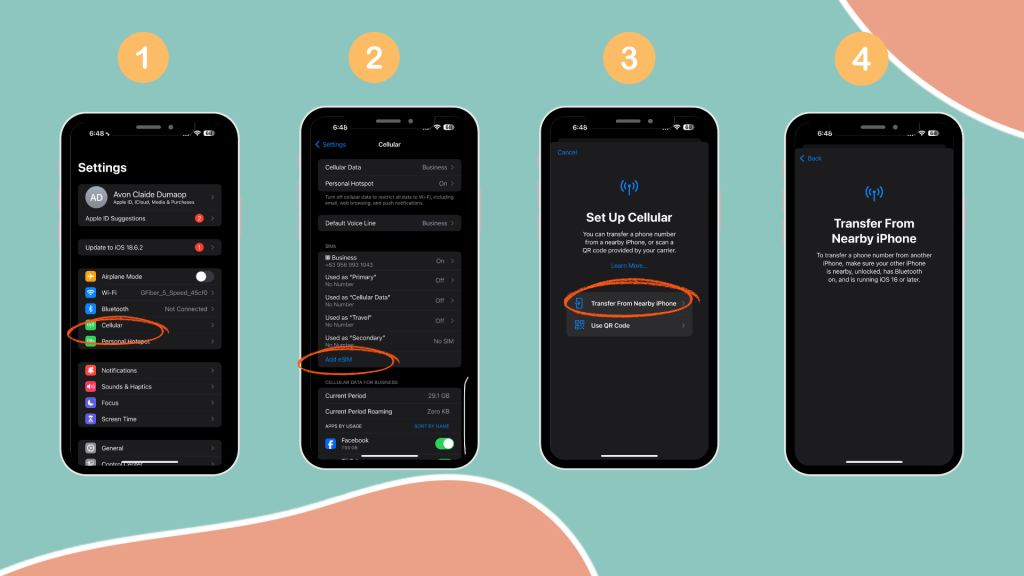
Here’s how you can transfer your eSIM using the new iOS 26 tools:
- On your iPhone, go to Settings > Cellular > Add eSIM.
- Select Transfer from Another Device.
- Choose iPhone or Android as the source.
- Confirm the transfer on your old device.
- Wait a few moments for activation—your eSIM is now live on your iPhone.
Countries Moving to eSIM-Only iPhones
Apple has already transitioned the iPhone 17 lineup to eSIM-only models in many regions. This shift marks a clear move toward a digital-first future, where travelers will increasingly depend on eSIM technology every time they upgrade to a new iPhone.
For anyone planning trips abroad, this change makes eSIMs more important than ever. Instead of searching for local SIM cards or waiting in long queues, you can activate an eSIM in seconds and stay connected the moment you land.
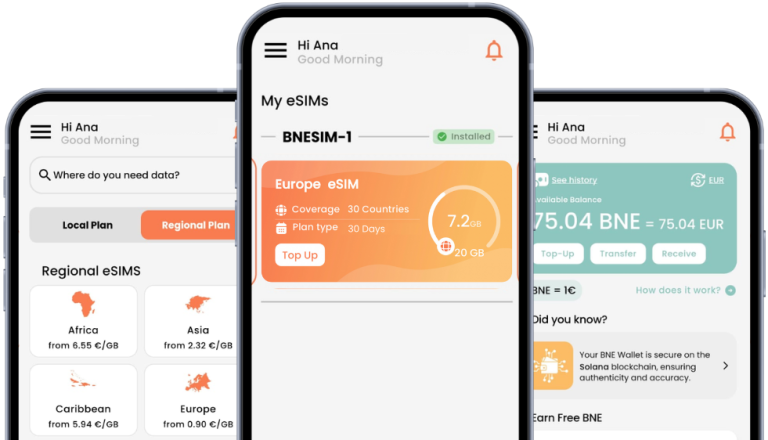
Whether your journey takes you across Europe, Asia, or the US, pairing your iPhone with a BNESIM travel eSIM plan ensures hassle-free connectivity, reliable coverage, and the freedom to manage your data entirely from your device.
Does BNESIM eSIM Work with iOS 26?
Absolutely. BNESIM eSIMs are fully compatible with iOS 26, so you can take advantage of all the new features Apple has introduced.
Here’s why BNESIM is the perfect match for iOS 26:
• Award-Winning Service: BNESIM has been recognized as the World’s Best Travel SIM Provider 2024, trusted by travelers worldwide.
• Flexible Data Options: Pick a 30-day package for short trips or go for non-expiring data for long or frequent trips.
• Affordable Global Coverage: BNESIM’s data rates are continuously updated to give you the best value in over 190 countries.
• Free WhatsApp Texting: Stay connected with friends and family in more than 190 destinations when you run out of your data.
FAQs
What’s the biggest benefit of iOS 26 eSIM for travelers?
The ability to transfer eSIMs between iPhone and Android without carrier intervention saves time and hassle.
Can I transfer my eSIM from iPhone to Android on iOS 26?
Yes! The new cross-platform transfer feature makes it possible.
Do all carriers support eSIM transfers in iOS 26?
Not yet. While iOS 26 enables the feature, some carriers are still rolling out compatibility. Always check with your provider before attempting the transfer.
Which iPhones support iOS 26 eSIM features?
Most iPhones (iPhone 11 and newer models) compatible with iOS 26 support the new eSIM features.
Conclusion
The iOS 26 eSIM update represents a big leap forward for travelers, offering smooth transfers, smarter connectivity, and a user-friendly setup. As Apple pushes further into the eSIM-only future, pairing your iPhone with a trusted provider like BNESIM ensures you’ll always have reliable, affordable data.

Kai Claide
A content creator with a love for the outdoors and pictures. A true beach person at heart, enjoys sunny coastlines, sipping matcha, and making the most out of every adventure. Curious and is always up for something fun.




 English
  Italiano