
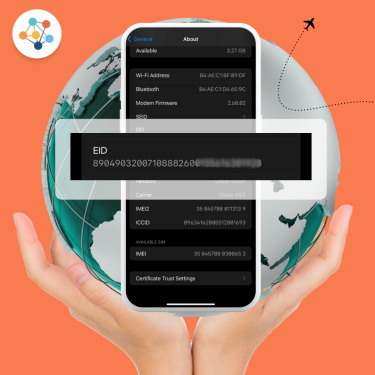
In the world of eSIMs, the EID plays a critical role, yet it’s often misunderstood. Think of it as the unique identity code for the tiny chip inside your phone that lets you download and switch mobile plans without a physical SIM. In this article, we’ll explain what an EID number is, how it differs from ICCID and IMEI, why it matters for eSIM technology, where to find it on your device, and how to troubleshoot common issues.
What Is an EID Number?
EID stands for “Embedded Identity Document.” It’s a unique 32-digit identifier assigned to devices that support eSIM (Embedded SIM) technology. Think of it as a serial number exclusively for your device’s eSIM chip.
Unlike traditional SIM cards, eSIMs are built into your phone or tablet, and the EID is essential for remote provisioning, allowing mobile carriers or providers to assign a mobile plan to your device digitally.
How EID Number Differs from SIM (ICCID) & Device (IMEI)?
| Term | Full Form | Function |
|---|---|---|
| EID | Embedded Identity Document | Unique to the eSIM chip; used for provisioning mobile plans |
| ICCID | Integrated Circuit Card Identifier | A unique number on each SIM or eSIM profile used to authenticate service for that profile |
| IMEI | International Mobile Equipment Identity | Identifies the physical device and is used for network authentication and tracking stolen devices |
Why an EID Number Matters in eSIM Technology?
Remote SIM provisioning
Carriers use your EID to send the correct profile to your device securely.
Multi-profile support
Multiple eSIM plans can be managed on one device, each tied to a different ICCID but using the same EID.
Security
The EID ensures that only your hardware receives activations, reducing risk of profile hijacking or errors
If you’re using providers like BNESIM, the EID is the first thing they’ll request to activate your eSIM.
Technical Role & Security of EID
Technically, the EID is pre-loaded on the eUICC chip at the factory, and is used to negotiate secure channels for provisioning new profiles. It supports over-the-air updates and ensures integrity in the eSIM ecosystem by preventing unauthorized profile loading.
What Does the EID Look Like?
An EID is a 32-digit numeric string. It’s longer than an ICCID and doesn’t change even when you replace eSIM profiles For example: 89049032000000000000123456789012
How to Find Your EID on Your Device?
iPhone users
- Go to Settings
- Tap General > About
- Scroll down to EID
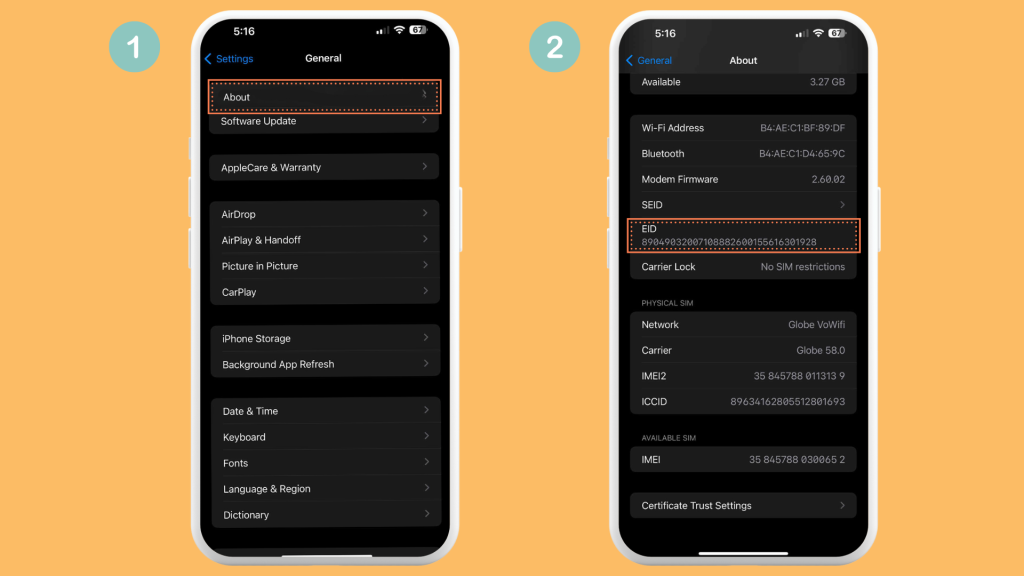
💡 If your iPhone supports eSIM, your EID will be visible here. If not, you won’t see it.
Android users
- Go to Settings
- Tap About Phone or About Device
- Look for EID, typically under SIM Status or Status Information
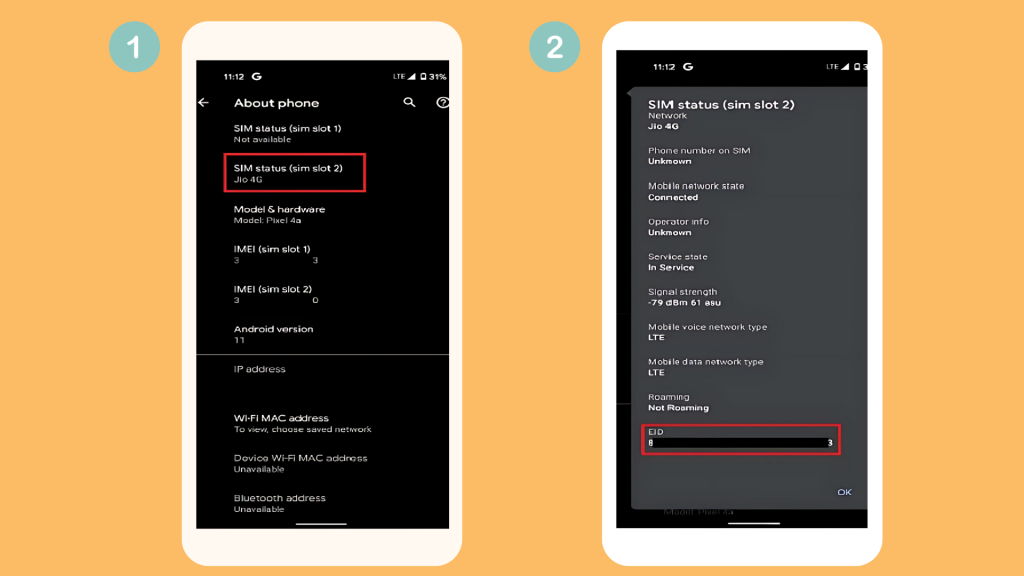
 On some Android devices, you can dial
 *#06# to display the EID (alongside the IMEI).
Common Troubleshooting Tips for EID Issues
EID Not Showing
▪︎ Ensure your device supports eSIM (You can check it here.)
▪︎ Make sure the device is updated to the latest software
▪︎ Navigate correctly to Settings → General/Status → About.
▪︎ If missing, contact support or check your device box
Mismatched EID/ICCID Errors
▪︎ This usually occurs when an eSIM profile is generated for a different EID.
▪︎ Confirm you’re using correct QR code for your device’s EID.
▪︎ Reset the eSIM profile and re-scan the code, or consult your eSIM provider.
FAQs
Do all devices have an EID number?
No. Only eSIM-capable devices have an EID. Older phones and some budget models do not support eSIM.
Can I change my EID number?
No. The EID is hardware-bound and cannot be changed or altered.
What is the difference between EID & ICCID?
EID identifies the eSIM chip/hardware itself, while the ICCID refers to specific eSIM profiles (e.g., different carrier plans) installed on that chip
Key Takeaways
▪︎ The EID number is a critical identifier for eSIM-enabled devices.
▪︎ It ensures seamless remote provisioning and enhances digital SIM security.
▪︎ Knowing how to locate your EID is essential for activating or troubleshooting your eSIM.
▪︎ If your EID isn’t showing, check device compatibility or contact your eSIM provider.
💡 Related Reads:
How Reliable is eSIM Connectivity While Traveling?

Kai Claide
A content creator with a love for the outdoors and pictures. A true beach person at heart, enjoys sunny coastlines, sipping matcha, and making the most out of every adventure. Curious and is always up for something fun.



 English
  Italiano