
Dual SIM functionality on iPhones is a game-changer for frequent travelers. But how does it work, and why should you care? In this blog, we’ll explore everything you need to know about dual SIM on iPhones and how BNESIM’s eSIM solutions can make your travel experience smoother than ever.
What Is Dual SIM?
Definition & How It Works
Dual SIM refers to a mobile phone’s ability to support two separate SIM cards for making calls, sending texts, and using mobile data. On iPhones, this typically comes in the form of either:
1. Physical SIM + eSIM
The iPhone has a slot for a physical SIM card and another for an eSIM, allowing two numbers to operate independently.
2. Dual eSIM
iPhones that support two eSIMs can connect to two carriers without a physical SIM card.
Types of Dual SIM
1. Dual SIM Dual Standby (DSDS)
Both SIMs can receive calls and texts. However, only one can be active for data at a time.Lorem ipsum dolor sit amet, consectetur adipiscing elit. Ut elit tellus, luctus nec ullamcorper mattis, pulvinar dapibus leo.
2. Physical SIM + eSIM
One SIM is physical, and the other is digital (eSIM), offering flexibility for dual-network usage.
3. Dual eSIM
A fully digital setup, with no physical SIM card slot. While convenient for international travelers, it requires specific carrier support for each eSIM profile.
Physical SIM + eSIM vs. Dual eSIM
| Feature | Physical SIM + eSIM | Dual eSIM |
| Hardware Slot Required | Yes (for physical SIM) | No |
| Ideal for | Travelers who want to keep their primary SIM active | Frequent flyers, digital nomads who want full digital flexibility |
| Device Compatibility | Widely supported | Limited to newer iPhones |
What iPhones Support Dual SIM?
Physical SIM + eSIM:
• iPhone XR
• iPhone XS / XS Max
• iPhone 11 series
• iPhone SE (2nd gen and later)
• iPhone 12, 13, 14 series
Dual eSIM support (no physical SIM required):
• iPhone 13 and later (iOS 15+)
• iPhone 14 and later
💡 Make sure your phone supports eSIM from our most updated list of eSIM-compatible devices.
How to Set Up Dual SIM on iPhone?
For Physical SIM + eSIM:
- Insert your physical SIM
- Go to Settings > Cellular > Add Cellular Plan. Scan the eSIM QR code or enter details manually.
- Label your plans (e.g., Personal for physical SIM, Work for eSIM)
- Set your default line for calls, texts, and mobile data.
For Dual eSIM:
- Ensure compatibility (iPhone 13+)
- Go to Settings > Cellular > Add Cellular Plan and follow the prompts to add both eSIMs
- Label your plans (e.g., Personal or Travel)
- Set your default line for calls, texts, and mobile data.
💡 Pro Tip: You can assign certain contacts to use a specific line!
How It Works: Managing Data, Calls & Texts
- • Data: Only one line can use mobile data at a time, but you can switch easily in Settings.
- • Calls/Text: Decide which line you want to use for calls and messages. Both lines can be active for receiving calls, but only one call can be active at a time. You can also choose to label each line (e.g., “Work” and “Personal”) for easy identification.
Why Dual SIM Is Perfect for Travelers?
Seamless Global Connectivity
Stay connected to local networks while keeping your home country number active. Perfect for international trips.
Cost Savings
Avoid roaming fees by using a local SIM for data, while keeping your original number active.
Efficient Communication
Manage work and personal calls/messages separately, all on one device.
Go Global with BNESIM on Dual SIM iPhones
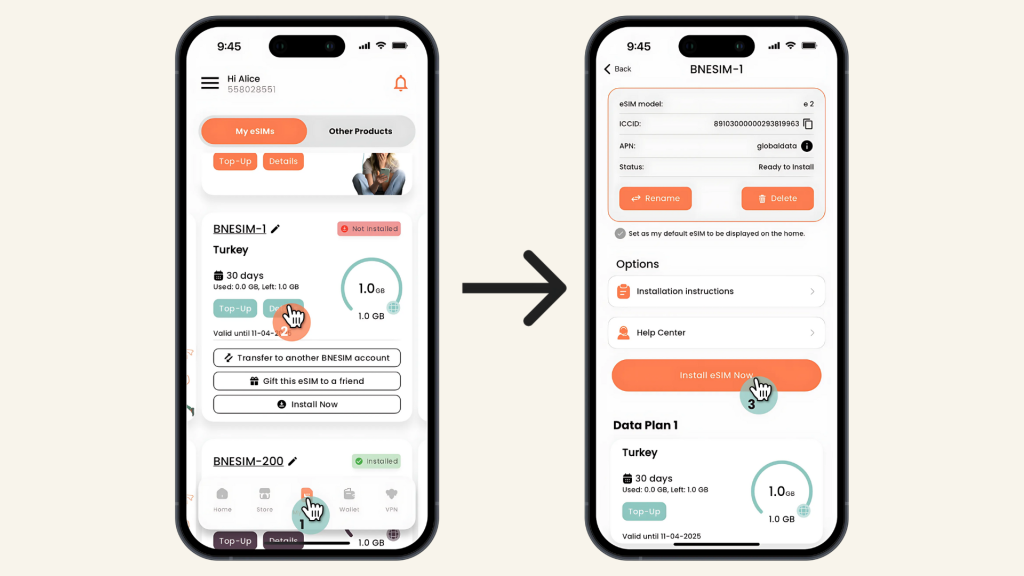
BNESIM makes travel effortless with instant eSIM activation directly from the BNESIM app. No need for a QR code. Just tap, install, and go.
Real Traveler Reviews
⭐️⭐️⭐️⭐️⭐️
“Worked great. I bought a 10GB eSIM for my holiday in Turkey. Everything worked perfectly: ordered before departure, installed instantly, and connected right away at the airport. Best part? I only paid €2.08 with a promo code instead of €7.08. Worked 1000x better than the hotel Wi-Fi!”
— Beck, DE
⭐️⭐️⭐️⭐️⭐️
“The app is very simple and easy to use — way better than the unreliable hotel Wi-Fi. Everything operated smoothly, and the live support team was polite and helpful. Thank you, BNESIM!”
— Erdem Özdemir, TR
⭐️⭐️⭐️⭐️⭐️
“Cheap and easy. I paid under $1 for 1GB in Europe, which was perfect for messaging. Installation through the app was quick — about two minutes. I just had to change one setting manually to activate the connection. So far, so good.”
— Ivan Boragine, PT
With flexible data plans, low rates, and reliable service, BNESIM is the perfect travel companion for Dual SIM iPhone users.
Disadvantages of Dual SIM
- • Battery Drain: Running two SIMs simultaneously can cause slightly higher battery consumption.
- • Limited Carrier Support: Some regions and carriers may not support Dual eSIM setups.
- • Storage Management: Having two active SIMs could potentially complicate data storage management, especially for apps and notifications.
FAQs
Can I use two eSIMs on iPhone?
Yes, newer iPhones (13 and later) support dual eSIM without needing a physical SIM.
Will I get two separate signals?
Yes, you will have two separate signals, each corresponding to the network of your physical SIM or eSIM, allowing independent use for calls, texts, and data.
How do I turn one SIM off temporarily?
Go to Settings > Cellular, tap the line you want to disable, and turn off the toggle.
Can I use dual SIM for WhatsApp?
You can only register one number with WhatsApp per device. But WhatsApp Business or other apps like Telegram can help manage the second number.
Conclusion
So, how does dual SIM work on iPhone? It’s the ultimate feature for convenience and flexibility, especially for travelers. Whether you’re managing work and personal lines or using one SIM for local calls and another for global data, dual SIM keeps you connected wherever you go.
With options like physical SIM + eSIM or dual eSIM, you can enjoy smooth switching, cost savings, and easy control, all from your iPhone.
 Try BNESIM’s global eSIM on your iPhone today and experience seamless travel connectivity without the roaming headaches.
💡 Related Reads:
What Is an EID Number? A Guide for eSIM Users
eSIM vs SIM: Which One’s Better for Travel?

Kai Claide
A content creator with a love for the outdoors and pictures. A true beach person at heart, enjoys sunny coastlines, sipping matcha, and making the most out of every adventure. Curious and is always up for something fun.


 English
  Italiano