
How to Check if iPhone is Unlocked? Quick Guide

Share:

Table of Contents

When you’re buying a new iPhone, switching carriers, or traveling abroad, one of the most important things to confirm is whether your device is unlocked. An unlocked iPhone gives you the freedom to use SIM cards or eSIMs from different carriers around the world, perfect for travelers who want to avoid roaming charges.

In this guide, we’ll walk you through how to check if iPhone is unlocked using multiple methods.

a woman is wondering how to check if her iphone is unlocked during her trip

What Does “iPhone Unlocked” Actually Mean?

Locked vs Unlocked iPhone

  • • Locked iPhone: Tied to a specific carrier. You can only use SIM cards from that carrier until the lock is removed.

  • • Unlocked iPhone: Works with any carrier worldwide, whether you’re using a physical SIM card or an eSIM.

Why It Matters for Travelers?

If you travel frequently, an unlocked iPhone lets you use local SIM cards or international eSIM provider like BNESIM abroad, avoiding expensive roaming fees. It’s essential for business travelers, digital nomads, or anyone who wants to switch between carriers easily for the best rates and coverage.

How to Check iPhone Unlock Status via Settings?

Step-by-Step Settings Method

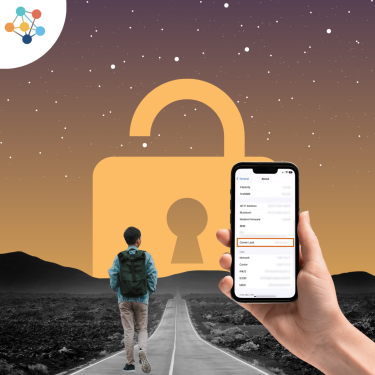
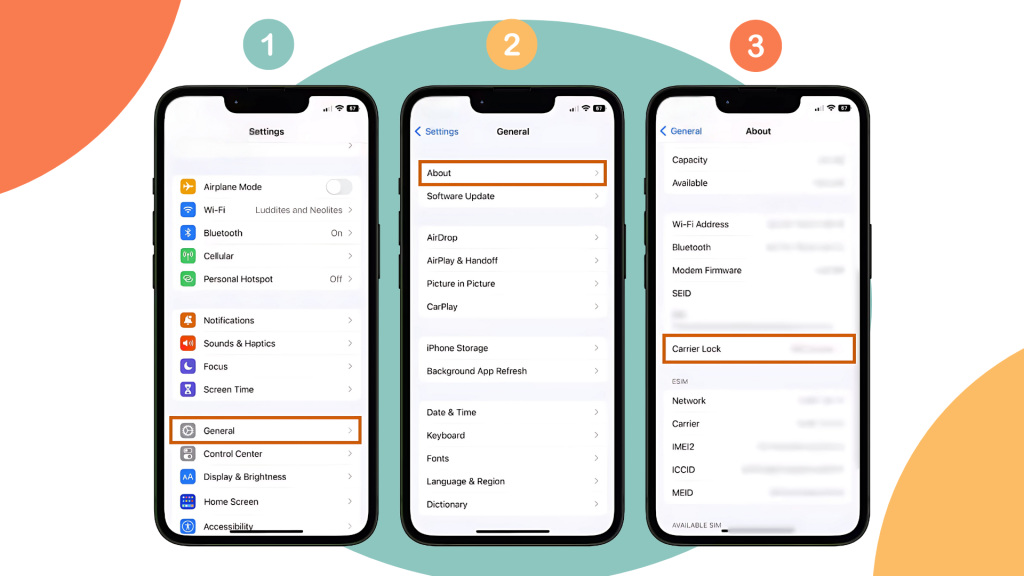
  1. Open Settings on your iPhone.
  2. Tap General > About.
  3. Scroll down to Carrier Lock.
    • • If it says “No SIM restrictions”, your iPhone is unlocked.

    • • If it lists a carrier, your iPhone is locked.

step-by-step screenshots of checking iPhone unlock status in the setting

Quick SIM Swap Test

  1. Turn off your iPhone.
  2. Insert a SIM card from a different carrier.
  3. Restart your iPhone.
    • • If the phone connects to the new network, it’s unlocked.

    • • If you see “SIM Not Supported,” it’s locked.

How to Check iPhone Unlock Status Using IMEI?

How to Find Your IMEI Number?

  • • Dial *#06# on your iPhone, or

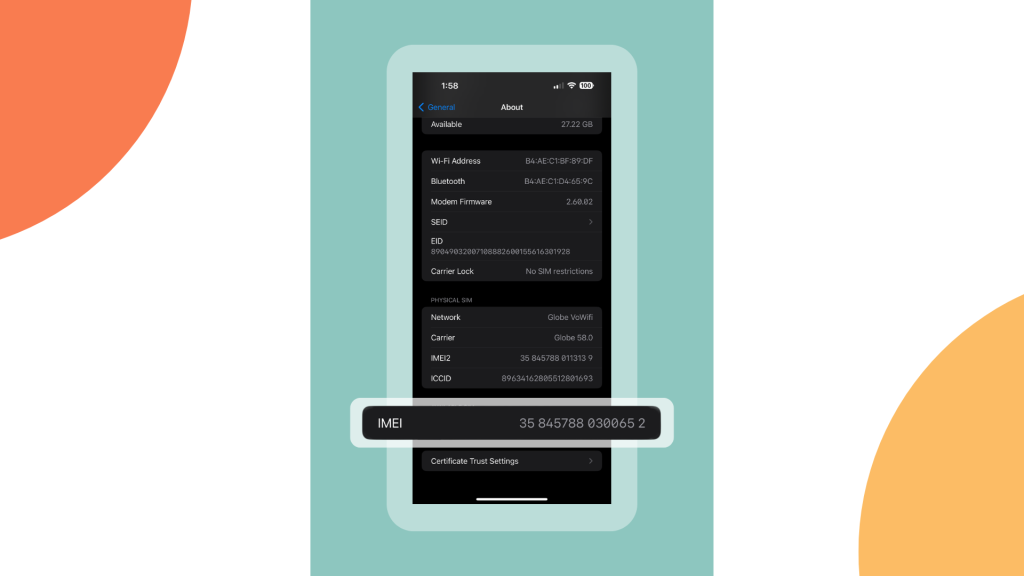
  • • Go to Settings > General > About > IMEI.

  • • You can also check the IMEI on the SIM tray or original packaging.

screenshot of IMEI number in an iPhone's settings

Online IMEI Checker Tools

Websites and apps can verify your iPhone unlock status using the IMEI. Popular tools include:

  • • IMEI.info

  • • iUnlocker

Confirm iPhone Unlock with Apple Support

Checking via Apple ID Account

Log in to Apple ID > Devices, select your iPhone, and check carrier information to confirm unlock status.

Contacting Apple Directly

Apple Support can confirm unlock status if you provide your IMEI number. Simply contact them via chat or call.

How to Unlock Your iPhone?

Carrier-locked iPhones are tied to a specific mobile network. To unlock:

  • • Contact your carrier and request an unlock (requirements may include finishing your contract, paying off the device, or having a good account standing).

  • • Follow the carrier’s instructions to complete the unlock, often done remotely.

Avoiding Locked iPhones When Buying Second-Hand

Risks of Carrier-Locked or Blacklisted iPhones

  • • You might not be able to use the phone outside the original carrier.
  • • Blacklisted devices (due to theft or unpaid bills) won’t work on most networks.

Verify Unlock Status Before Purchase

  • • Always check Carrier Lock in Settings.
  • • Request the IMEI number and verify through Apple or a trusted IMEI checker.
  • • Test with a foreign SIM card if possible.

Troubleshooting Common Unlock Issues

Phone Shows “SIM Not Supported”

  • • Ensure the SIM is activated.

  • • Restart the iPhone and try again.

  • • Contact your carrier if the issue persists.

International SIM Doesn’t Work

  • • Confirm your iPhone is fully unlocked.

  • • Check the network compatibility (GSM vs. CDMA).

  • • Check if your phone supports eSIM, which is often more reliable for global use.

How BNESIM eSIM Ensures Compatibility

Once unlocked, your iPhone can use BNESIM eSIMs for instant international connectivity. Plans cover 200+ countries, include non-expiring options, and are easy to manage in-app. Check BNESIM’s list of supported devices to confirm compatibility.

FAQs

Can I use a prepaid SIM on a locked iPhone?

No, unless the prepaid SIM is from the same carrier your iPhone is locked to.

Check Carrier Lock in Settings or use an IMEI checker. Factory unlocked devices will always show No SIM restrictions and will work with any SIM or eSIM globally.

Carrier unlock requests can take anywhere from a few hours to a few days, depending on the carrier’s policy.

Why Checking Unlock Status Matters?

Knowing if your iPhone is unlocked saves you money and frustration. An unlocked device:

• Offers flexibility to switch carriers.

• Ensures seamless international connectivity with local SIMs or BNESIM eSIM.

Before you travel or buy second-hand, always confirm your iPhone’s unlock status. It’s the key to staying connected anywhere in the world.

👉🏻Try BNESIM’s global eSIM on your iPhone today and experience seamless travel connectivity without the roaming headaches.

💡 Related Reads:

What Is an EID Number? A Guide for eSIM Users

What Is IMEI Number? How to Check & Why It Matters

Picture of Kai Claide

Kai Claide

A content creator with a love for the outdoors and pictures. A true beach person at heart, enjoys sunny coastlines, sipping matcha, and making the most out of every adventure. Curious and is always up for something fun.

Display of bnesim eSIM interface showcasing various connectivity options and user-friendly features.
BNE eSIM

One eSIM, Global Coverage No more switching between eSIMs!

Download the
BNESIM eSIM App
The quick & easy way to manage your eSIMs
More Posts
Five gold awards against a white backdrop, highlighting the recognition as a five-time World Travel Tech Awards winner, 2024.
BNESIM is the World Travel Awards winner of

"World's Best Travel SIM Provider"
en_USEnglish