
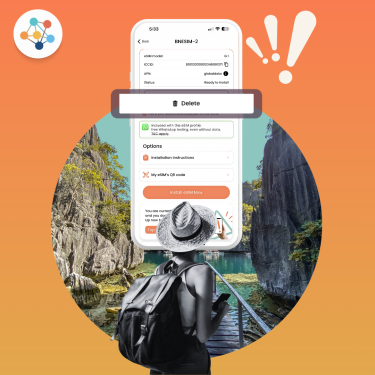
eSIMs are changing the way we stay connected, whether you’re traveling internationally or just switching phones. But what happens if you delete your eSIM by accident?
Spoiler: not all deletions are equal, and in some cases, your mobile data plan can be recovered. In this guide, we’ll explain what deleting an eSIM really means, what to expect depending on how it was removed, and how BNESIM users can stay in control.
What Is an eSIM?
An eSIM (embedded SIM) is a digital version of the plastic SIM card. It lives in your phone’s hardware and allows you to activate a mobile data plan without inserting anything physical. It’s perfect for frequent travelers, digital nomads, or anyone who wants a clean dual-SIM setup.
💡 Want a deeper dive into how it works? Check out our full guide to what an eSIM is and how it works.
What Does Deleting an eSIM Mean?

When you delete an eSIM, you’re essentially removing the mobile profile that allows your phone to connect to your carrier’s data network. This could mean:
• Losing access to your mobile data plan
• Removing all stored settings for that profile
• Being unable to make calls or use mobile internet through that eSIM
It’s not like deleting an app. You might not be able to reinstall it easily depending on how and where it was deleted.
Why Deleting Your eSIM Can Cause Issues?
Unlike physical SIM cards that can be removed and reinserted, eSIMs often have one-time activation restrictions. Deleting your eSIM may:
• Break your mobile connection
• Invalidate your QR activation code
• Require support or fees to recover the plan
• Cause trouble abroad if you’re relying on mobile data
In short, you can’t simply re-download it unless the provider supports that.
Can You Recover a Deleted eSIM?
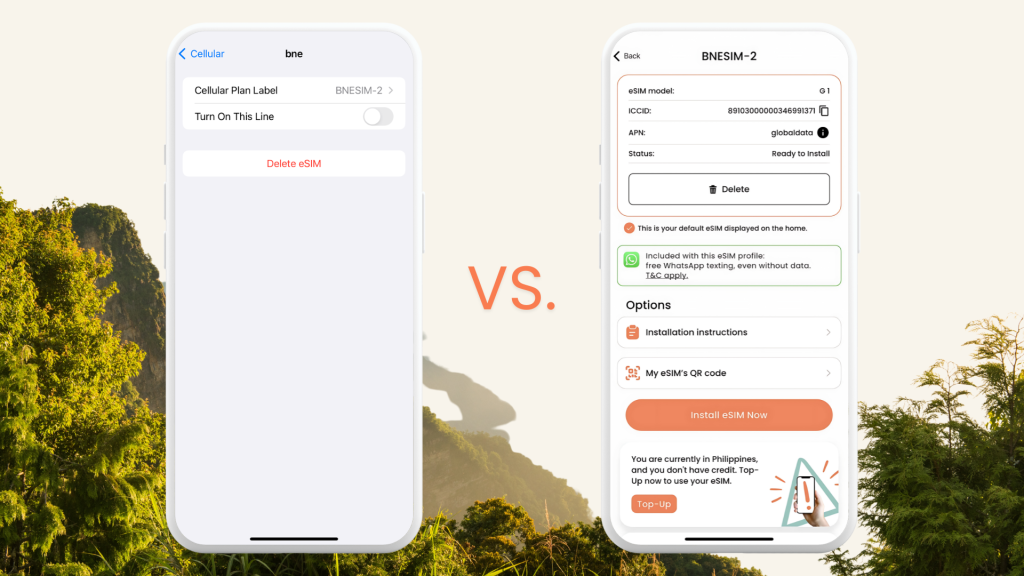
⭕ Deleted from Phone Settings – Good News
If you deleted your BNESIM eSIM from your phone settings only, you’re in luck. You can reinstall it easily through the BNESIM app, as long as you’re using the same device. Just log in, go to your eSIM profile, and follow the steps to reinstall.
❌ Deleted from the BNESIM App – Important Warning
If you delete the eSIM directly from the BNESIM app, it’s permanent. The data profile is erased from your account and cannot be restored. In this case, you’ll need to purchase a new eSIM.
What Happens with Other Providers?
Different eSIM providers handle deletion and recovery differently:
• Some allow free reinstallation within a set period
• Others use one-time QR codes that cannot be reused
• Some charge a fee for reinstalling or transferring your eSIM to a new device
Always read the fine print and make sure you know your provider’s eSIM recovery policy before making any changes.
What If I Accidentally Deleted My eSIM When Travel?
If you haven’t left yet:
Reinstall your eSIM via the BNESIM app (if deleted only from settings). Test the connection before your departure.
If you’re already abroad:
Connect to Wi-Fi, open the BNESIM app, and try reinstalling. If the eSIM was deleted from the app, contact BNESIM support via in-app live chat or [email protected] as soon as possible to explore your options.
Common Reasons for Deleting an eSIM
Not every deletion is accidental. Here’s why some users remove eSIMs:
- • Post-travel cleanup
- • Switching providers
- • Troubleshooting connection issues
- • Device transfer or resale
In any case, understanding what deletion actually does helps avoid losing access to your data.
How to Avoid Deleting Your eSIM Again?
• Label your eSIM profiles clearly so you know which one to keep (e.g., “BNESIM Thailand”)
• Avoid deleting from the app only remove via settings
• Back up your account credentials so you can log in quickly when needed
• Avoid app deletion or tampering unless absolutely necessary
💡 If you’re using an iPhone, make sure you understand how eSIMs are listed under your mobile data settings. Apple provides a clear guide on how to manage eSIMs on iPhone, including how to remove them safely.
FAQs
Can I reuse the old QR code?
No, BNESIM eSIM QR codes are one-time use only.
Will deleting an eSIM cancel my data plan?
No, deleting the eSIM doesn’t cancel your BNESIM data plan if it’s deleted from your phone’s setting, but you won’t be able to use it unless reinstalled. However, deleting the eSIM from the BNESIM app will terminate your data plan and can’t be reversed.
Can I transfer my eSIM to another phone?
Yes, you can transfer your BNESIM eSIM to another device. There’s a €1 fee for transferring it to a new phone.
Does BNESIM charge for replacement eSIMs?
No charge for reinstalling on the same device if you accidentally delete your eSIM from your phone’s setting. Transferring to a new device costs €1.
Handle With Care
An eSIM might be digital, but deleting it can come with very real consequences, especially when you’re traveling. If you’re a BNESIM user, rest assured that reinstalling your eSIM is possible if done from settings. But if you delete it from the app, you’ll need to buy a new one.
Be careful, stay connected, and always double-check before hitting “delete.”
💡 Related Reads:
How to Transfer Your BNESIM eSIM to Another Phone?

Kai Claide
A content creator with a love for the outdoors and pictures. A true beach person at heart, enjoys sunny coastlines, sipping matcha, and making the most out of every adventure. Curious and is always up for something fun.




 English
  Italiano